# Unable to Install VISAN
**URL:** https://forum.atmospherictoolbox.org/t/unable-to-install-visan/98
**Category:** VISAN
**Created:** [March 28, 2020, 5:48pm UTC](https://forum.atmospherictoolbox.org/t/unable-to-install-visan/98 "2020-03-28T17:48:42Z")
**Posts on this page:** 9
**Page:** 1
### Author:  [@avid](https://forum.atmospherictoolbox.org/u/avid)
#### Post date: [March 28, 2020, 5:48pm UTC](https://forum.atmospherictoolbox.org/t/unable-to-install-visan/98/1 "2020-03-28T17:48:43Z")
I have this error when run “cmake -DCMAKE\_INSTALL\_PREFIX=$CONDA\_PREFIX”:
=====================
CMake Warning:
No source or binary directory provided. Both will be assumed to be the
same as the current working directory, but note that this warning will
become a fatal error in future CMake releases.
– The C compiler identification is unknown
– The CXX compiler identification is unknown
CMake Error at CMakeLists.txt:3 (project):
The CMAKE\_C\_COMPILER:
```
cl
```
is not a full path and was not found in the PATH.
To use the NMake generator with Visual C++, cmake must be run from a shell
that can use the compiler cl from the command line. This environment is
unable to invoke the cl compiler. To fix this problem, run cmake from the
Visual Studio Command Prompt (vcvarsall.bat).
Tell CMake where to find the compiler by setting either the environment
variable “CC” or the CMake cache entry CMAKE\_C\_COMPILER to the full path to
the compiler, or to the compiler name if it is in the PATH.
CMake Error at CMakeLists.txt:3 (project):
The CMAKE\_CXX\_COMPILER:
```
cl
```
is not a full path and was not found in the PATH.
To use the NMake generator with Visual C++, cmake must be run from a shell
that can use the compiler cl from the command line. This environment is
unable to invoke the cl compiler. To fix this problem, run cmake from the
Visual Studio Command Prompt (vcvarsall.bat).
# Tell CMake where to find the compiler by setting either the environment variable “CXX” or the CMake cache entry CMAKE\_CXX\_COMPILER to the full path to the compiler, or to the compiler name if it is in the PATH.
Could you help me?
---
### Author:  [@sander.niemeijer](https://forum.atmospherictoolbox.org/u/sander.niemeijer)
#### Post date: [March 29, 2020, 10:49am UTC](https://forum.atmospherictoolbox.org/t/unable-to-install-visan/98/2 "2020-03-29T10:49:21Z")
To build VISAN from source on Windows you need to have Visual Studio 2015 installed.
You can then invoke cmake as is done for the official conda package build: [bld.bat](https://github.com/stcorp/conda-recipes/blob/master/visan/bld.bat)
But why are you building VISAN from source and are you not installing the binary version?
---
### Author:  [@avid](https://forum.atmospherictoolbox.org/u/avid)
#### Post date: [March 29, 2020, 3:09pm UTC](https://forum.atmospherictoolbox.org/t/unable-to-install-visan/98/3 "2020-03-29T15:09:22Z")
Thank you very much for your answer.
I followed the instruction of the README.txt file
===========================
Copyright © 2002-2019 S[&]T, The Netherlands.
```
VISAN 4.0 Release Notes
```
VISAN is a Visualisation and Analysis application that was designed to be a
front-end for CODA and HARP, but is general enough to be appropriate for a much
wider range of applications. VISAN provides a full Python command line interface
that allows you to read and inspect instrument product data via CODA or HARP,
manipulate the data, and create advanced 2D Plots and Worldplots.
The currently supported platforms are Windows (7 and higher), Linux, and macOS
(10.8 and higher).
# Installation
VISAN is available exclusively as a conda package.
To install the binary version for your platform you will first need to install
Anaconda or Miniconda, then activate the conda environment in which you want to
install VISAN, and finally install VISAN itself using:
$ conda install -c stcorp visan
The VISAN application can then be found in your conda environment.
To build VISAN from source, clone the VISAN github repository and create a
conda environment with the VISAN application as follows:
$ conda env create -f environment.yml
$ conda activate visan
$ cmake -DCMAKE\_INSTALL\_PREFIX=$CONDA\_PREFIX
$ make install
# Documentation
Full documentation in HTML is included with the VISAN software.
A version matching the latest development status on GitHub can be viewed at:
```
http://stcorp.github.io/visan/
```
# Download
The VISAN software can be downloaded from GitHub:
```
https://github.com/stcorp/visan/
```
VISAN Developers
S[&]T, The Netherlands
===========================
Do you have another method?
---
### Author:  [@sander.niemeijer](https://forum.atmospherictoolbox.org/u/sander.niemeijer)
#### Post date: [March 29, 2020, 3:23pm UTC](https://forum.atmospherictoolbox.org/t/unable-to-install-visan/98/4 "2020-03-29T15:23:28Z")
VISAN can only be installed within a CONDA environment. If this is not working for you then please explain the problem you encounter.
---
### Author:  [@avid](https://forum.atmospherictoolbox.org/u/avid)
#### Post date: [March 31, 2020, 1:44pm UTC](https://forum.atmospherictoolbox.org/t/unable-to-install-visan/98/5 "2020-03-31T13:44:49Z")
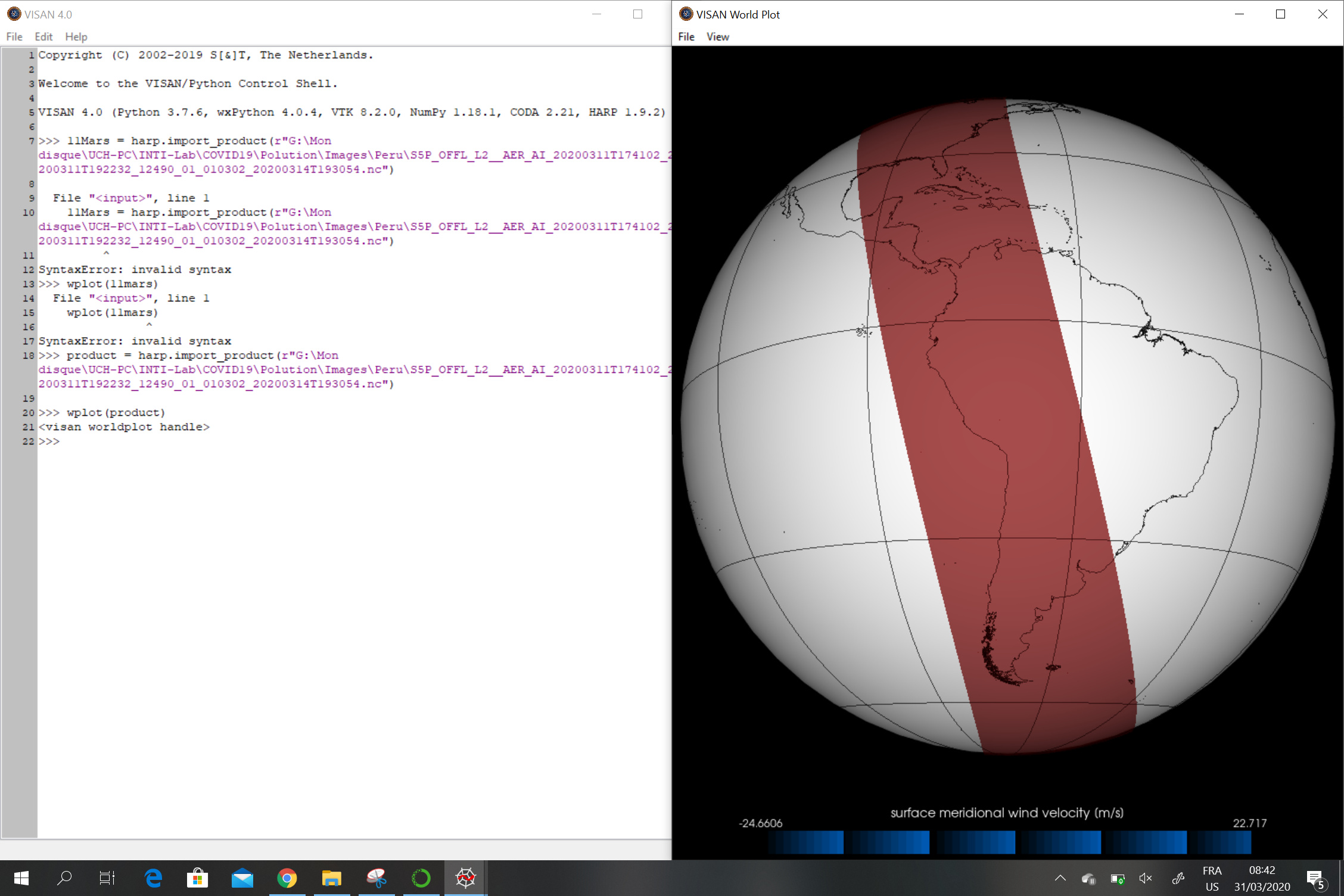
I installed VISAN, but it does not work correctly.
---
### Author:  [@yunuskaya](https://forum.atmospherictoolbox.org/u/yunuskaya)
#### Post date: [May 22, 2020, 1:48am UTC](https://forum.atmospherictoolbox.org/t/unable-to-install-visan/98/6 "2020-05-22T01:48:58Z")
Hi, my anaconda environment doesn’t include ‘visan’. How can I solve this problem? Thank you so much.
---
### Author:  [@tuinder](https://forum.atmospherictoolbox.org/u/tuinder)
#### Post date: [January 7, 2021, 6:37pm UTC](https://forum.atmospherictoolbox.org/t/unable-to-install-visan/98/7 "2021-01-07T18:37:37Z")
VISAN does not install on my standard (‘out of the box’) default anaconda environment.
The current common Python version that anaconda has by default is 3.8.
Is there a reason why VISAN is has this particular requirement of the ‘a0’ in its spec?
Can this restriction be removed in the general package, or by the user?
$ conda install -c stcorp visan
Collecting package metadata (current\_repodata.json): done
Solving environment: failed with initial frozen solve. Retrying with flexible solve.
Solving environment: failed with repodata from current\_repodata.json, will retry with next repodata source.
Collecting package metadata (repodata.json): done
Solving environment: failed with initial frozen solve. Retrying with flexible solve.
Solving environment: \
Found conflicts! Looking for incompatible packages.
This can take several minutes. Press CTRL-C to abort.
failed
UnsatisfiableError: The following specifications were found
to be incompatible with the existing python installation in your environment:
Specifications:
- visan -\> python[version=’\>=3.6,\<3.7.0a0|\>=3.7,\<3.8.0a0’]
Your python: python=3.8
If python is on the left-most side of the chain, that’s the version you’ve asked for.
When python appears to the right, that indicates that the thing on the left is somehow
not available for the python version you are constrained to. Note that conda will not
change your python version to a different minor version unless you explicitly specify
that.
---
### Author:  [@sander.niemeijer](https://forum.atmospherictoolbox.org/u/sander.niemeijer)
#### Post date: [January 8, 2021, 9:12am UTC](https://forum.atmospherictoolbox.org/t/unable-to-install-visan/98/8 "2021-01-08T09:12:51Z")
VISAN itself supports Python 3.8. The problem is that VISAN depends on wxPython, and the version of wxPython that is available in the default Anaconda channel only supports up to Python 3.7.
The guys at Anaconda did an excellent job by including VTK and wxPython (which allows us to bring VISAN to Anaconda as well), but unfortunately they are not that good in keeping these packages up-to-date.
There is however also the conda-forge channel, which is much better in keeping up-to-date versions of packages. However, the conda-forge channel and the default Anaconda channel are not really compatible. So using the packages from the [stcorp channel](https://anaconda.org/stcorp) with conda-forge won’t work.
For this reason we have started to create an [stcorp-forge channel](https://anaconda.org/stcorp-forge). This already includes versions of CODA, and HARP for all platforms. But for VISAN we currently only have versions for Windows and macOS (including Python 3.8). There is still a build issue that we need to resolve for Linux. We hope to get this fixed soon.
---
### Author:  [@aaron\_p](https://forum.atmospherictoolbox.org/u/aaron_p)
#### Post date: [November 1, 2021, 9:56pm UTC](https://forum.atmospherictoolbox.org/t/unable-to-install-visan/98/9 "2021-11-01T21:56:13Z")
Probably too late to help, but I had to create a conda environment with a lower version of python (3.7). Only then was able to install visan.